User Guide · 16
Marketplace Playbook: How Often to Post and How to Arrange Accounts
You do 3 steps and the app does the rest: get ready, create a campaign, choose the days and time. Every run deletes and reposts, so post each item 2–3 times a week. How to split one account into two batches, how to arrange many accounts in two groups with time slots, what to do when listings are flagged, and three don'ts.
Updated 2026-11-086 min readFor app v1.7.3
A short Marketplace playbook for Prism Reach users: how to set it up, how often to post, and how to arrange several accounts. You do 3 steps. The app does the rest.
- Get ready: turn on Marketplace in your post, and set your region in Facebook
- Create a campaign: pick one account, then the posts and groups
- Choose which days and what time
The app handles: health check → delete the old listing → post the new one → share to groups → record the result.
The screenshots show the app in Chinese. The buttons are in the same places in the English version.
16.1 Step 1: Get ready
Two things to prepare before you post:
① Turn on Marketplace in your post. In the Content Library, edit the post, open "Marketplace" and enable it. Fill in title, price, currency, condition and location. If you import a listing from Mudah / iBilik / iProperty, tick "Also set up as Marketplace items" and it fills in for you. See 2 · Creating & Managing Content.
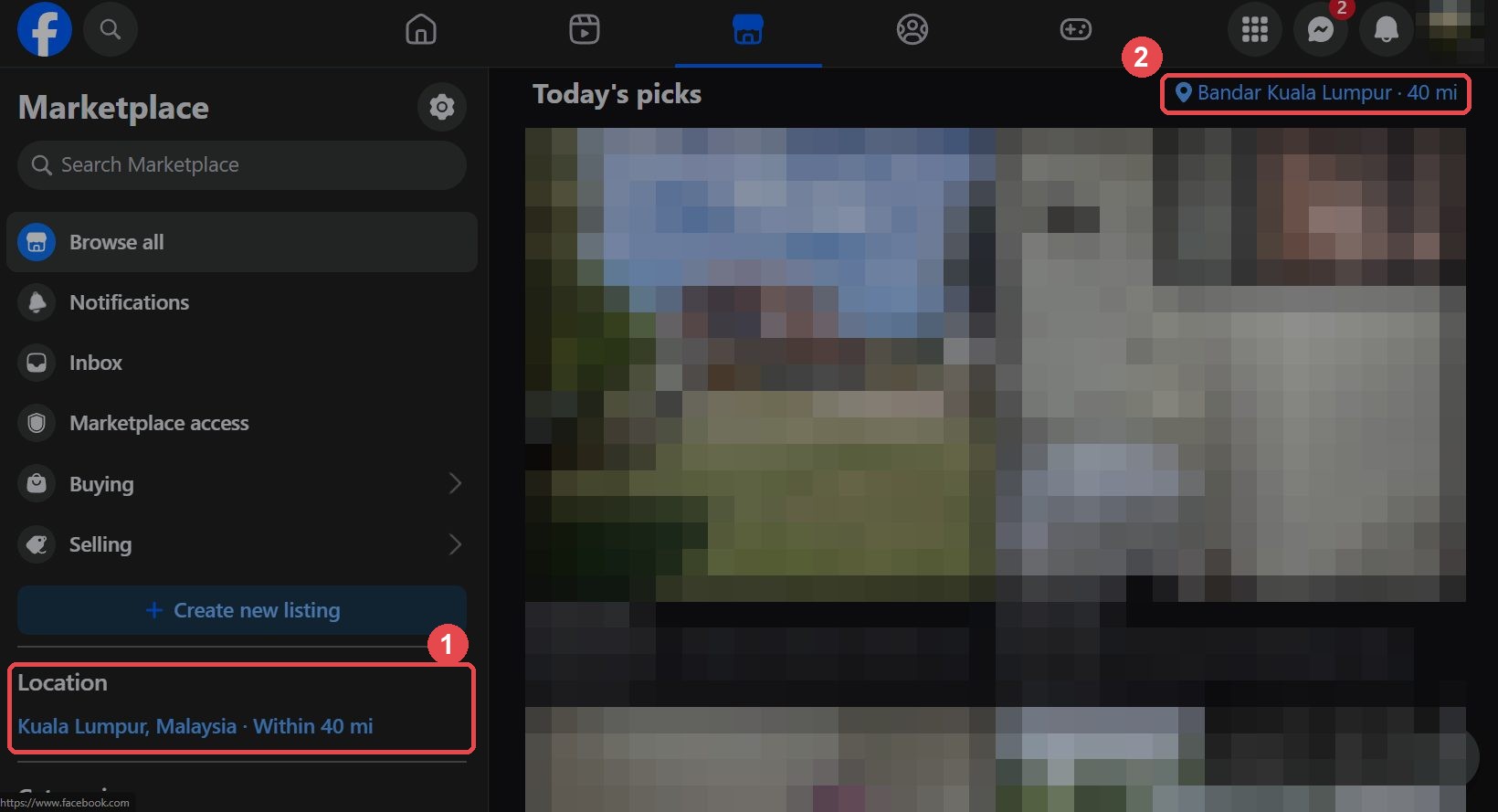
② Set your Marketplace region in Facebook. This is done in Facebook, not in the app. Open Facebook Marketplace with this account, click the region in spot 1 or 2 of the picture below ("Location" on the left, or the top right), set your country and city, then click Apply.
16.2 Step 2: Create a campaign
Go to the Marketplace page → New campaign. There are 3 steps: Campaign, Items, Schedule.
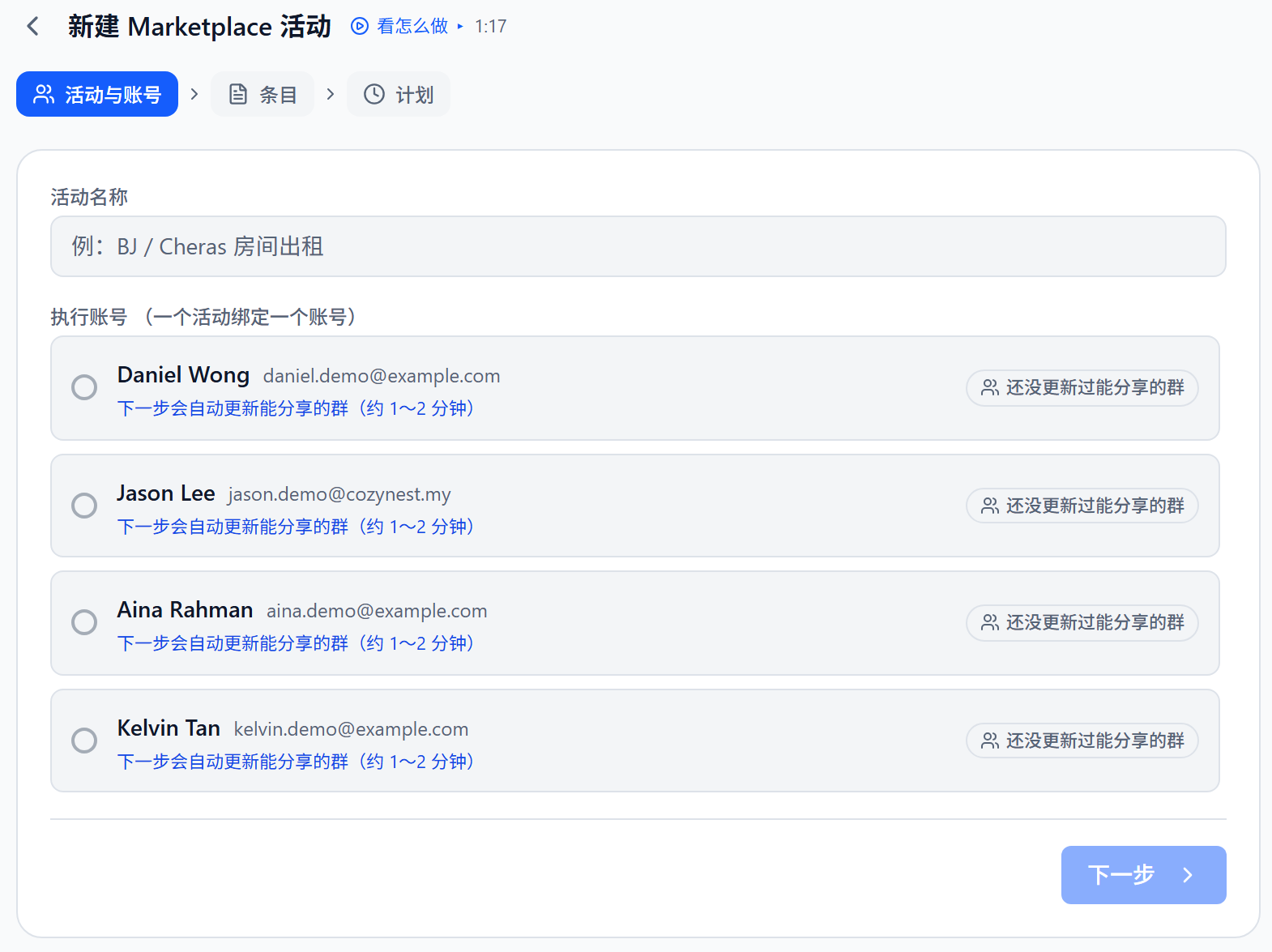
- Pick one account. A campaign is tied to one account. When you click "Next", the app refreshes the groups this account can share to. It takes about 1–2 minutes. You don't need to run a separate check.
- Items. Each item = a set of posts + the groups to share to. Selecting all groups is usually fine. If the account has unrelated groups, filter by area, type or tag.
- Schedule. See the next section.
16.3 Step 3: Choose which days and what time
Each run deletes the old listing and posts a new one. So don't schedule too often. Reposting the same item every day makes Facebook more likely to flag it as a duplicate or rate-limit you.
In the schedule step, choose "Recurring schedule" → "Fixed time each week", then pick which days and what time (none selected = every day).
If it's too frequent, the app warns you:
Our advice: post each item 2–3 times a week.
16.4 One account
One account = one Marketplace. Facebook judges "duplicate" per account, so:
- Put each item in one account only.
- One campaign per account, with all of that account's items in it, posted in one go. The app puts no limit on the number of items.
In the schedule step choose "Fixed time each week", pick Mon, Wed, Fri and Sun (to fill the week), and set the time:
| Mon | Tue | Wed | Thu | Fri | Sat | Sun | |
|---|---|---|---|---|---|---|---|
| Campaign (all items) | ✅ | ✅ | ✅ | ✅ |
That's 4 times a week. The app will show the "quite frequent" warning. You can ignore it, or post on fewer days to be safer (the app suggests 2–3 times a week). Sunday is when customers have time on their phones, so always include it.
16.5 Many accounts
If you have many items and many accounts, split the accounts into two groups and take turns. Use a few time slots each day, one account per slot. This is a suggested layout. We haven't tested every case on real Facebook, so treat it as advice.
| Mon | Tue | Wed | Thu | Fri | Sat | Sun | |
|---|---|---|---|---|---|---|---|
| Morning | Acc 1 | Acc 4 | Acc 1 | Acc 4 | Acc 1 | Acc 4 | Acc 1 |
| Noon | Acc 2 | Acc 5 | Acc 2 | Acc 5 | Acc 2 | Acc 5 | Acc 2 |
| Evening | Acc 3 | Acc 6 | Acc 3 | Acc 6 | Acc 3 | Acc 6 | Acc 3 |
Group A (accounts 1·2·3) runs Mon, Wed, Fri, Sun. Group B (accounts 4·5·6) runs Tue, Thu, Sat. Each account keeps one fixed time slot. Something posts every day, Sunday included. Group A posts 4 times a week and will see the "quite frequent" warning. You can ignore it, or post on one fewer day to be safer. Group B posts 3 times a week.
How to set it up: each account gets its own campaign. In the schedule step choose "Fixed time each week" and pick the days and time. Stagger the times, for example 10:00, 14:00 and 20:00.
Keep in mind:
- Each item goes in one account only. More accounts means more different items, not the same item posted more times.
- Your accounts have mostly the same groups. Use tags to split the groups so different accounts share to different groups, and a group doesn't get posts from several accounts in a day.
- 6 accounts needs the Pro plan (Starter allows up to 3).
16.6 When something goes wrong
Facebook flags come in three kinds:
| Flag | What it means | What you do |
|---|---|---|
| In review | Just posted, Facebook is still checking | Nothing. Wait for it |
| Duplicate | Two identical listings on the same account | Delete the extra one. No need to change the content |
| Violation | Facebook says the content itself has a problem | Edit the content and change the title in the Content Library, then click "Restore" |
If an account gets 3 violations within 30 days, the app pauses all Marketplace posting for that account. This protects the account. It isn't a fault. After you fix the flagged posts, click "Resume" on the banner at the top of the page.
More detail in 7 · Marketplace Publishing.
16.7 Three don'ts
- Don't put the same item in two accounts, or in two campaigns of one account. They fight over the same listing and look like duplicates.
- Don't delete and repost every day. 2–3 times a week per item is enough.
- Don't write risky content. Naming a race, religion or nationality in the text, or silly prices (like RM1 as bait), are common reasons for violations. The app doesn't check your wording, so read it before you post. After repeated violations, Facebook may take Marketplace away from that account for good, and appeals rarely work.
16.8 Reference
| Plan | Can you use Marketplace? |
|---|---|
| Free | 10 trial runs (only successful posts count) |
| Starter | 10 trial runs (up to 3 accounts) |
| Pro | Yes (up to 20 accounts) |
| Team | Yes (up to 60 accounts) |
Prepaid users pay 10 credits per item per month. It doesn't depend on how many groups you share to. Reposting the same item on other days in the same month isn't charged again. Failed posts aren't charged.
For more on limits and safety, see 13 · Will My Account Get Banned?. For the group posting playbook, see 15 · Facebook Group Posting Playbook.
Don't have Prism Reach yet?
The free plan needs no credit card — install it and follow this guide.