User Guide · 05
Warm-up Plan: How to Warm Up New Facebook Accounts
Why new or newly bought Facebook accounts shouldn't post straight away. What auto warm-up does (feed, groups, likes, Reels), the four personas, health score, and how to configure it.
Updated 2026-09-143 min readFor app v1.7.3

Any account that's just been added — newly registered, newly bought, or moved from another computer — should run 「Auto」 warm-up for about a week before it starts posting.
5.1 Why warm up
A freshly registered Facebook account that starts posting right away is very likely to get banned. Warm-up has the app automatically behave like a real person using Facebook — scrolling the feed, looking at groups, liking, watching Reels — to build up some genuine-looking history and lower the ban risk.
It's also how an account moves up from "Brand new" through "Warming up → Stable → Mature & active" and unlocks higher posting limits (see the table in 01 · Account Management & Login).
5.2 What warm-up does
| Action | Notes |
|---|---|
| Browse home feed / group feeds | Scroll the feed, look at joined groups |
| Browse notifications | A quick look, like a person would |
| Like / react to posts | Random interactions |
| Leave a generic comment | Low frequency, generic |
| Visit own profile | — |
| Watch Reels | Short videos |
| Accept friend requests | Passive, low risk |
| Add suggested friends | Active; 48-hour cool-down; only for accounts at Stable or above |
Each account gets a "persona" so different accounts behave at different rhythms, instead of a batch of accounts acting identically and being spotted as a bot cluster:
- Scanner: skims quickly, likes occasionally
- Reader: reads carefully, interacts more
- Engager: interacts actively, comments often
- Lurker: active late at night, keeps a low profile
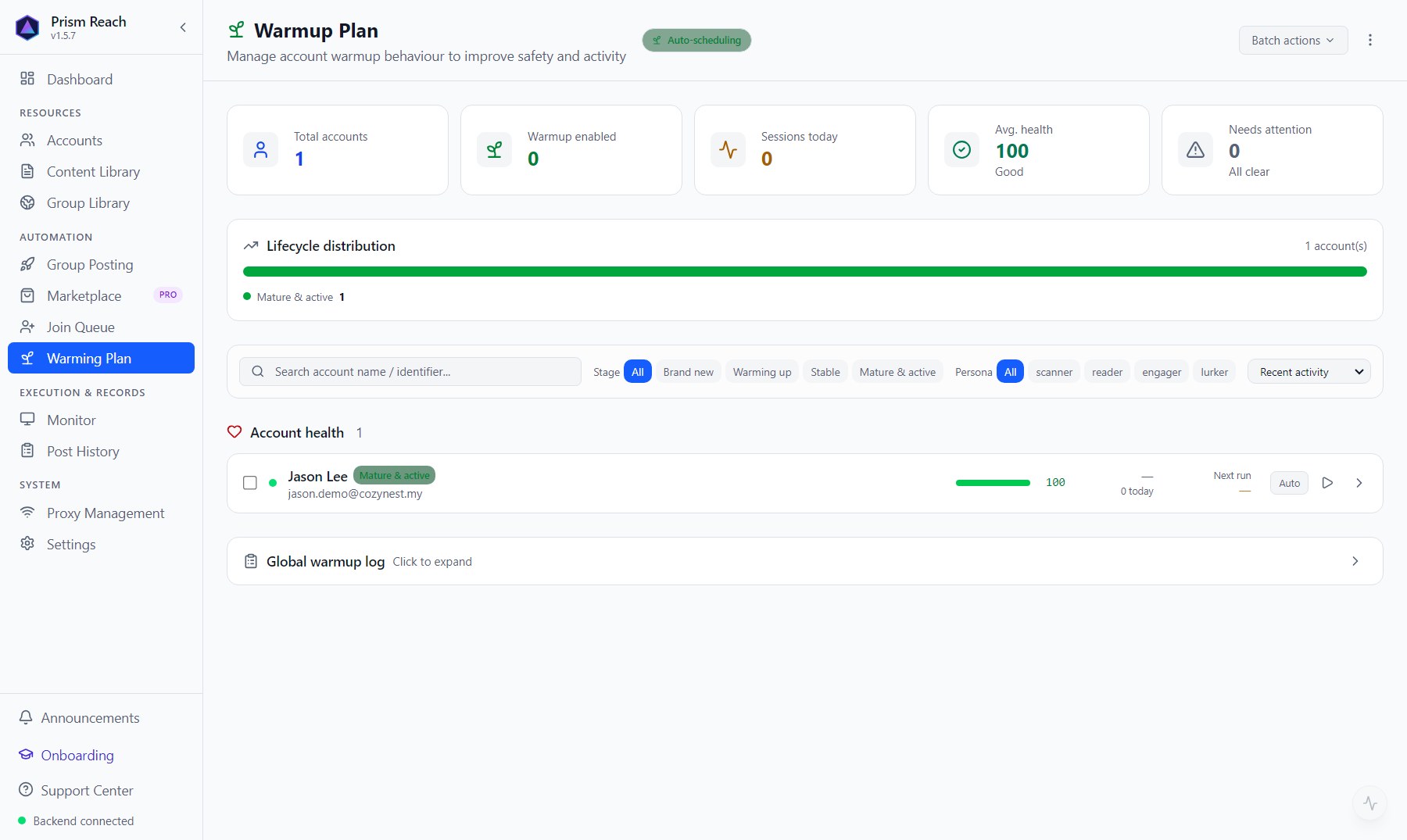
5.3 What the page shows
- Top stats: total accounts / warm-up enabled / sessions today / average health / needs attention (health below 60 or restricted).
- Lifecycle distribution: which tier each of your accounts is in, at a glance.
- Filter accounts by age tier and persona.
- One row per account: health score, sessions today, next run, the 「Auto」 toggle, "warm up now". Expand it for health events, warm-up log, tier history and this account's warm-up settings.
- 「Global warmup log」 at the bottom: warm-up records for all accounts.
5.4 Settings
Per account:
- Tick the actions to use (unticked = never done)
- Max likes, max Reels watch time (0 = automatic)
- Turn automatic warm-up on / off for this account
Globally, under Settings → Execution engine: how many accounts warm up at the same time. While posting jobs are running this drops to 1 automatically, so posting gets priority.
5.5 In one sentence
Warm-up isn't an optional extra — it's the foundation for posting steadily over time. Account age + health score decide how much an account can post today; warm-up keeps both moving up. If an account never seems to post much or its health is low, check whether it's time to turn on warm-up.
Don't have Prism Reach yet?
The free plan needs no credit card — install it and follow this guide.